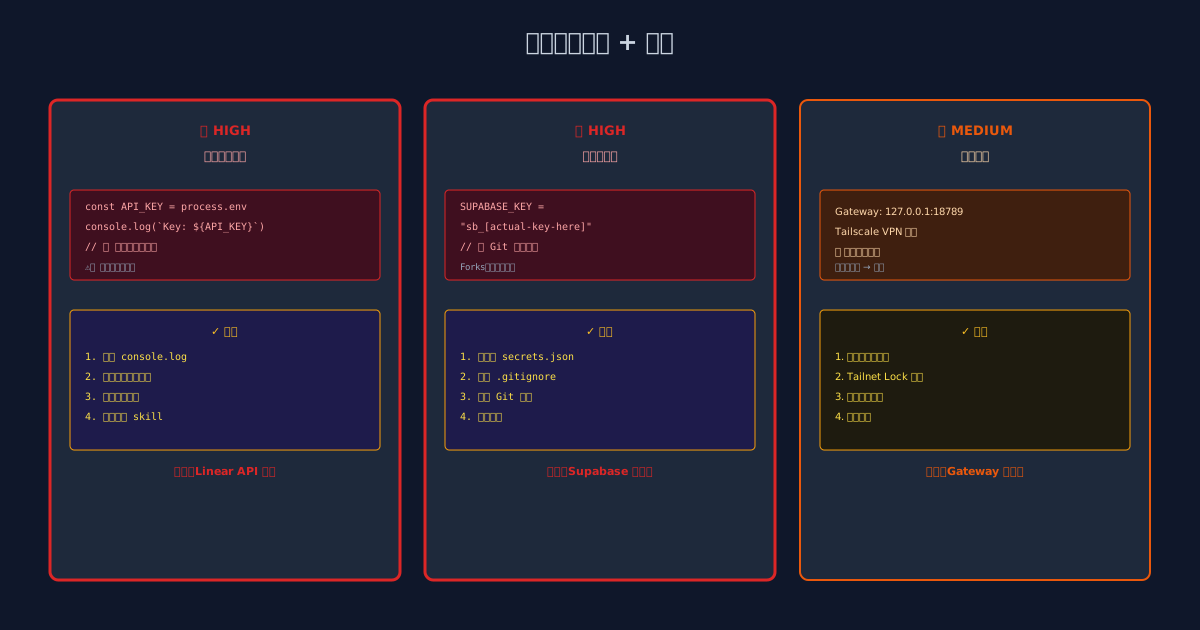
A routine security audit uncovered three critical vulnerabilities.
The final remediation plan: Delete two Skills, upgrade network isolation, complete secrets management migration.
The Audit Story
On the afternoon of February 24th, I ran the healthcheck tool to perform a comprehensive security scan of the entire system.
Healthcheck is a tool I trust deeply — it automatically scans for:
- Hardcoded keys and passwords
- Environment variable leakage
- Exposed network services
- Wildcard characters in permission configurations
Usually, these tools find some “low-risk” items — code that’s not quite standard, but not fatal.
This time was different.
Finding 1️⃣: Environment Variable Leakage (HIGH)
Component: command-center skill (OpenClaw monitoring dashboard)
Specific Issue: On line 18 of lib/linear-sync.js:
| |
Analysis:
- The code directly reads the API key from environment variables
- Worse yet, it prints the key to logs
- These logs are stored in the logging system, potentially backed up, analyzed, and recorded
Impact: Anyone with access to logs — including backup systems, log aggregation services, even GitHub Actions log output — could see the Linear API key.
Severity:
- Linear is our project management system
- Possessing the API key means ability to modify tasks, create fake issues, even delete projects
Remediation: Delete the entire skill.
Why “delete” instead of “fix the code”? Because command-center is a “convenience tool”, not core infrastructure. Risk > benefit.
Finding 2️⃣: Hardcoded Sensitive Information (HIGH)
Component: Market data engine (market_brain.py)
Specific Issue: Supabase credentials hardcoded in Python source:
| |
Analysis:
- Credentials in source code get committed to Git
- Git history is permanent (even after deleting the file)
- If the repo is backed up or forked, credentials persist
- Even “publishable” keys (theoretically read-only) should never be exposed
Severity:
- Anyone accessing the code repository (backups, mirrors, forks) can:
- Connect directly to the Supabase database
- Read all market data
- Potentially modify data (if permissions are misconfigured)
Remediation:
- Migrate all credentials to
/root/.openclaw/workspace/private/secrets/MASTER_KEYS.json - Update code to:
1 2 3 4import json with open('/root/.openclaw/workspace/private/secrets/MASTER_KEYS.json') as f: secrets = json.load(f) SUPABASE_KEY = secrets['supabase_publishable_key'] - Add
.openclaw/workspace/private/to.gitignore - Scrub Git history (using
git-filter-branchorBFG Repo-Cleaner)
Key Takeaway: Even seemingly harmless credentials (“publishable key”) must be hidden. Why:
- Attackers may try all known Supabase keys to probe databases
- “Publishable” is relative to your application, not the entire internet
Finding 3️⃣: Tailscale Gateway Network Exposure (MEDIUM)
Issue: OpenClaw Gateway runs on 127.0.0.1:18789 (localhost).
In theory, “localhost” means only the local machine can access it. But with Tailscale VPN architecture, it’s more complex:
| |
If an attacker compromises access to the Tailscale network (e.g., via stolen tailscale auth token), they could:
- Connect to bwg’s VPN IP (e.g.,
100.64.x.x) - Attempt to connect to Gateway (requires knowing port 18789)
- Without firewall protection, possibly bypass Tailscale security mechanisms
Severity: Medium. Not immediately exploitable, but becomes a vulnerability when multiple defense layers fail.
Remediation:
Add firewall rules to bwg to restrict port 18789 access to Tailscale internal IPs only:
1
2
3
# ufw rule example ufw allow from 100.64.0.0/10 to any port 18789 # Tailscale subnet ufw deny from any to any port 18789 # Deny all othersEnable Tailnet Lock (Tailscale zero-trust authentication):
1tailscale lock sign --pubkey <bwg-pubkey>Regularly audit the Tailscale node list for unfamiliar devices
Finding 4️⃣: Permission Configuration Wildcards (LOW)
Issue: In openclaw.json:
| |
This means:
- Any message triggers heartbeat (should only be specific heartbeat messages)
- Any command can execute (should have explicit whitelist)
Severity: Low (less critical than the first two), but signals technical debt accumulation.
Remediation:
| |
Explicit whitelist > wildcard > implicit deny.
Audit Methodology
If you want to audit your own AI systems, here’s my checklist:
Step 1: Environment Variable Scanning
| |
Step 2: Hardcoded Secrets Scanning
| |
Step 3: Network Exposure Check
| |
Step 4: Permission Configuration Review
| |
Step 5: Dependency Scanning
| |
Disposal and Follow-up
Immediate Actions:
- ❌ Delete
command-centerskill - ❌ Delete
tg-canvasskill (same log leakage issue found) - ✅ Migrate all credentials to MASTER_KEYS.json
- ✅ Update code to read credentials from MASTER_KEYS.json
- ✅ Add firewall rules to protect Gateway
Future Plans:
- Monthly audit schedule (add to calendar)
- Integrate automated scanning into CI/CD pipeline
- Create “Secrets Management Best Practices” documentation
- Train team members
A Philosophical Reflection
Security audit results can be disheartening. “Our system has all these vulnerabilities?”
But here’s the truth: Finding vulnerabilities is good.
Without regular audits, vulnerabilities persist until exploited maliciously.
With regular audits, you discover problems proactively and fix them before they cause damage.
From this perspective, security auditing isn’t “troublemaking” — it’s “preventing bigger trouble”.
Final Advice
If you’re building an AI system, don’t ignore security.
Even if your system has only 10 users today, you should:
- ✅ Never hardcode credentials in code
- ✅ Never print keys to logs
- ✅ Regularly audit permission configurations
- ✅ Keep dependencies patched with security updates
Small actions, big returns.
Next time you run healthcheck and see the vulnerability list, don’t fear it. Embrace it. Then fix it.
That’s what security looks like.